Code350 has grown into a much bigger AI building platform in 2026
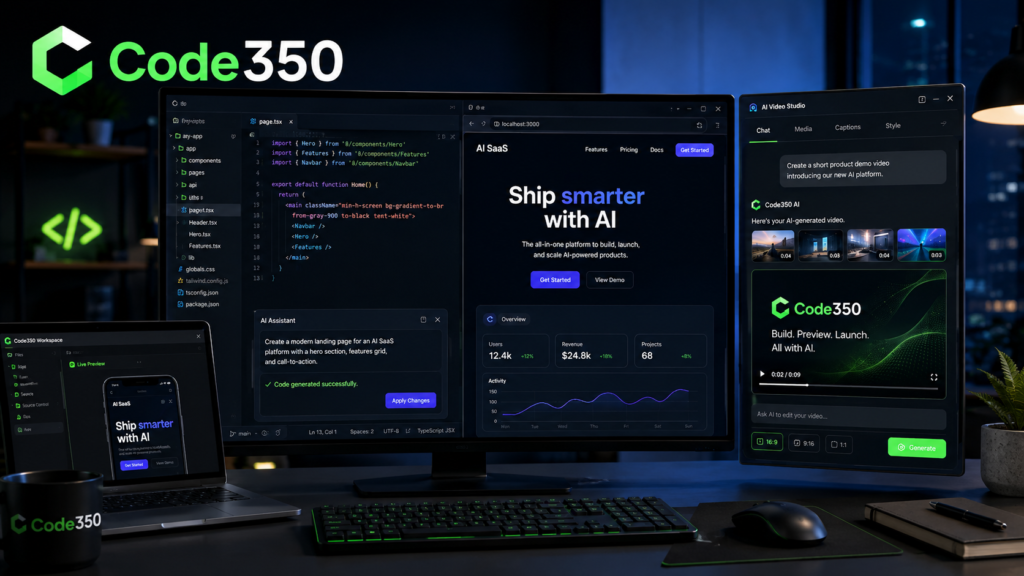
Code350 now combines an AI coding workspace, AI video creation, hands-on courses, one-on-one teaching, AI consulting and a growing portfolio of live software projects.
What started as a simpler learn-and-build proposition is becoming something broader: a place where people can learn, create, build and actually ship with AI.
When we first looked at Code350 earlier in 2026, the most interesting part was simple.
It was trying to remove the painful beginning from coding.
Instead of spending your first hours installing development tools, working out terminals, configuring packages and staring at error messages you barely understood, Code350 offered a browser-based environment where AI could help you start building.
That basic idea is still there.
But after revisiting Code350 in August 2026, the platform is noticeably larger than the version covered in the original LegitFOMO story. The coding Workspace remains important, but Code350 now also has a separate AI video product called Code350 Studio, a growing course catalogue, paid teaching and consulting services, a shared subscription system and a portfolio showing what founder Ryan Reiss says he has built for real clients and his own products.
This changes the story.
Code350 is no longer particularly interesting because it is another website that can generate code from a prompt.
There are plenty of those.
The more interesting question now is whether Code350 can bridge the widening gap between asking AI to make something and actually understanding, improving and shipping what AI creates.
That is a much bigger challenge.
What Code350 is in August 2026
Code350 describes itself around a straightforward idea: build real apps and learn as you go.
Its main platform combines an AI-powered coding environment with courses intended to help users create working software rather than simply memorise programming syntax. The browser-based Workspace provides the coding side, while the education side provides courses and access to one-on-one instruction.
There is now another significant piece.
Code350 Studio extends the platform outside traditional software development and into AI-assisted video creation. Instead of working around a conventional video-editing timeline, Studio is built around describing edits in chat and allowing the AI system to construct the composition.
One of the most interesting additions is the AEO Blog Engine, a practical Code350 course built around creating and deploying your own answer-engine-optimised blog. Rather than simply teaching people how to write articles, the course focuses on building a working publishing system designed for the new search environment where Google, AI assistants and answer engines increasingly surface direct answers. Code350 presents it as an AI-guided project that can take a user from an idea to a deployed blog in roughly two hours. At the time of our August 2026 check, Code350 was advertising an early-bird price of $199 against a regular price of $299, although pricing and availability can change.
That addition fits Code350 particularly well. AI is changing both sides of publishing. It can help people build the website itself, but it is also changing how readers discover information once that website is online. Google’s current guidance remains clear that there is no secret separate optimisation required for AI results. Helpful, original, people-first content, strong technical SEO and clear site structure remain the foundation. The Code350 AEO Blog Engine appears designed around helping users build that foundation rather than merely chasing an AI-search gimmick
Then there is the service business.
Code350 currently offers one-on-one coding lessons, AI consulting for businesses and done-for-you full-stack development. That gives it an unusual position because the same business is teaching people to build, providing them with AI tools to build and offering to build the application for them when necessary.
That combination is becoming the real Code350 story.
The Workspace is still the heart of Code350
The Code350 Workspace remains the clearest expression of the original idea.
It is a development environment running in the browser. A user can describe what they want to build in ordinary language, have AI generate or change code, see a live preview and work with a conventional code editor without first installing a local development environment.
That matters most for beginners.

Installing development software is not impossible, but anyone who has taught themselves coding knows how easily the first night can disappear into Node versions, package managers, dependencies, environment variables and obscure error messages before anything useful appears on screen.
Code350 attempts to remove much of that initial friction.
The current Workspace says users can work with Next.js, React, React with Express, Vue, Vue with Express, SvelteKit, Angular and a Base Mini App Web3 environment. It also includes GitHub integration, repository importing, live previews and team collaboration.
That makes the Workspace more than a text box that spits out snippets.
You can work on an application, inspect the generated code, modify it, push the project into GitHub and ultimately move it outside Code350.
That last part matters.
One of the risks with simplified AI development platforms is that users can become dependent on the platform itself. Code350’s GitHub approach at least points toward ordinary development workflows rather than deliberately trapping a project inside a closed builder.
Code350 has added more choice in the AI itself
The Workspace is also no longer tied to one AI model.
At the time of our August 2026 check, Code350’s Workspace said users could choose among models from Anthropic, OpenAI and xAI, with the current page specifically listing Claude, GPT and Grok options.
The precise model lineup can change as providers release new versions, and Code350 itself says its Studio model selection evolves over time. That is worth remembering before treating any particular model name as permanent.
The broader idea is sensible.
Different AI systems can behave differently when generating a new interface, finding a bug, explaining unfamiliar code or restructuring an existing application. Giving users a choice lets the Workspace become more of an AI development layer rather than a wrapper around one provider.
That is useful for experienced developers as well as beginners.
Code350 Studio may be the biggest change since the original article
The biggest new development missing from the old LegitFOMO story is Code350 Studio.
Studio is a browser-based AI video editor where the interface is built primarily around conversation.
Instead of manually dragging clips around a traditional editing timeline, the user can give instructions such as making a short reel from uploaded photos, adding timed captions, creating lyrics, adjusting transitions, generating a voiceover or changing the overall visual style.
According to Code350, Studio can work with uploaded photos, audio and video, generate images, create voiceovers, generate AI video clips on qualifying plans, produce word-timed captions and lyrics, save reusable styles and export finished work as MP4 video.
The interesting part is not simply that AI is involved.
AI video tools are everywhere now.
The more interesting design decision is reducing the amount of editing knowledge required to express what you want.
You can essentially act more like the director than the editor.
Tell the system what you want changed. Look at what it produced. Then tell it what to change again.
That lowers a different kind of barrier from the coding Workspace, but the philosophy is very similar.
Describe the outcome. Let AI handle more of the mechanical work. Learn enough to guide the result.
Studio can handle far more than simple captions
The current Studio help documentation shows how far the product has moved beyond a basic automated reel maker.
Users can upload their own media, tell Studio which assets to use, ask for generated images, request voiceover narration, add music, automatically transcribe audio, produce karaoke-style lyrics and save combinations of fonts, colours, motion and effects as reusable styles.
There is also an undo and checkpoint system. Code350 says a checkpoint is created before each AI turn, allowing users to reverse unwanted changes rather than trying to manually reconstruct an earlier edit.
That is a small feature with a big practical benefit.
AI systems occasionally misunderstand perfectly reasonable instructions. Being able to say “undo that” is much closer to how ordinary people expect a creative assistant to behave.
One subscription now covers coding and video
Another significant update is the connection between Workspace and Studio.
Code350 says one subscription now works across both products, with AI tokens shared between the coding environment and video Studio.
As checked on 12 August 2026, the Workspace listed a free tier at $0, Starter at $19 per month, Pro at $49 per month and Business at $99 per month. The paid levels increase monthly AI-token allocations, request limits, storage, preview capacity, collaboration allowances and access to premium AI models.
Studio displays the same broad $0, $19, $49 and $99 subscription levels and explicitly says the same paid subscription applies to both Studio and the AI Code Editor.
Pricing and allowances can change, so anyone reading this later should check the current Code350 pricing pages before purchasing.
But combining two products under one subscription is an interesting move.
Someone building an application may also need promotional videos. Someone creating content in Studio may eventually want a website or application around that content.
Code350 is beginning to connect those jobs rather than selling them as completely unrelated products.
There is still a genuine free entry point
Code350 currently provides free access to both the Workspace and Studio.
The Workspace free tier was listed with 100,000 AI tokens per month, five requests per hour, 50 MB per project, limited live-preview idle time, one collaborator and access to its free AI model.
Studio also lists 100,000 tokens per month on its free plan, alongside AI image generation, voiceover and unlimited free exports. AI-generated video clips are reserved for paid plans according to the current pricing and help pages.
That gives people a way to test whether the workflow makes sense for them before subscribing.
For an AI tool, that matters.
Screenshots and demonstrations can make almost any AI product look magical.
The real test is giving it your own messy instruction, your own code or your own media and seeing how it behaves.
The education side has expanded as well
Code350 is still very clearly an education business.
Its course catalogue currently combines free introductory material with paid courses designed around complete projects.
Among the free options visible during our check were Build & Deploy a Next.js Site in 10 Minutes and Build Your First Component, a React-focused beginner course integrated with the Code350 Workspace.
The important distinction is that Code350 does not present its course system as purely video-based learning.
Its stated approach is project-based.
The goal is to build something that can actually be deployed while learning the development concepts involved. Paid courses are described as including self-paced lessons, practice projects, code examples and completion certificates.
That is much closer to the way many people now learn technology in the real world.
You need something.
You begin building it.
You reach something you do not understand.
You learn that piece.
Then you keep moving.
The AEO Blog Engine is a very 2026 addition
One of the newest Code350 courses is particularly relevant to publishers and website owners.
The site currently promotes an AEO Blog Engine course built around creating and deploying an answer-engine-optimised blog that the user owns. Code350 describes it as an AI-guided project intended to get a working system deployed in roughly two hours. At the time of our check, the site displayed an early-bird price of $199 against a regular price of $299, although promotional pricing and availability can change.
The timing makes sense.
Search has changed considerably as AI-generated answers have become more visible.
Google’s own 2026 guidance continues to emphasise the basics: useful, original, people-first information, a clear technical structure and content that genuinely answers what people are looking for. Google explicitly says there is no separate magic optimisation required merely to appear in generative AI search experiences.
That makes an AEO course more useful when it teaches good publishing and technical fundamentals rather than simply selling a new collection of tricks.
Code350 still makes an important distinction about AI coding
There is one part of Ryan Reiss’s approach that deserves more attention than the usual AI-coding hype.
He does not present understanding code as irrelevant.
On his About page, Reiss explains that he began coding in 2018, before today’s generative AI development tools existed, and argues that AI can make a developer faster without replacing the fundamentals needed to think through a software problem.
The Code350 Workspace similarly positions AI as a tutor or pair programmer rather than simply a machine users should blindly trust. Its educational material emphasises explanations, debugging, project architecture and understanding why code works.
That distinction matters enormously in 2026.
It is now possible for a person with very little traditional programming experience to produce surprisingly sophisticated software.
But generating an application is not the same thing as being able to maintain it.
Sooner or later there will be an authentication problem, a database issue, an API change, a security vulnerability, a payment failure or an unexpected edge case.
At that point, understanding starts to matter.
AI lowers the floor.
It does not remove the ceiling.
Ryan Reiss gives Code350 a personal identity
Code350 was founded by Ryan Reiss, a Chicago-area full-stack developer who says he has been coding since 2018 and specialises in technologies including React, Next.js and TypeScript.
His story also explains the somewhat unusual name.
Reiss describes Code350 as the idea of always remaining 10 degrees away from mastery. Technology keeps changing, so complete mastery is never permanent. The philosophy is to remain close enough to understand what you are doing while continuing to learn.
That philosophy suits AI development surprisingly well.
Nobody is finishing the learning process anymore.
Models change.
Frameworks change.
APIs change.
Search changes.
Developer tools change.
The useful skill becomes learning how to move with those changes without losing the basic engineering judgement underneath them.
The portfolio makes Code350 more interesting than a course site alone
One of the strongest improvements to Code350 since our original look is the amount of project information now visible.
The current portfolio displays seven projects across AI, education and Web3. These include QueryQuarry, ÂTTN.LIVE, Lake Park Reunions, Brushing to the Beat, BaseX402, Human Geography Map and MakeCryptoMemes.
These are Code350 and Ryan Reiss’s own case-study descriptions, so project performance claims should be understood as first-party information unless separately verified.
Even with that caveat, the portfolio is useful.
People considering an AI course or hiring a developer can see the kinds of problems being tackled instead of relying entirely on claims about technical ability.
QueryQuarry shows where AI-native software may be heading
QueryQuarry is one of the more unusual projects in the portfolio.
Code350 describes it as a double-blind talent marketplace where recruiters can query a structured pool of consenting candidates through an AI assistant using the Model Context Protocol, or MCP. Candidate identities remain hidden until both sides reach the relevant consent stage.
What makes it interesting is the interface philosophy.
Instead of forcing a recruiter to learn yet another dashboard, the concept is that an AI client becomes the interface and QueryQuarry supplies the underlying structured service.
That is a useful glimpse of where some AI software may be heading.
The application does not always need to be the screen you stare at.
Sometimes it may simply be the reliable system another AI is allowed to talk to.
The ÂTTN.LIVE rebuild shows a different side of the work
Another prominent project is ÂTTN.LIVE, a creator platform with AI generation tools, media features and an internal token economy.
Code350’s case study says Reiss was brought in to migrate the system from SQLite to Supabase PostgreSQL and rebuild the application using a server-first Next.js architecture. The portfolio says the migration involved 27 tables and that more than 100 API endpoints were rebuilt.
Those numbers are first-party project claims, but the underlying point is useful.
There is a large difference between generating a new demonstration app and inheriting an existing application containing real data, technical debt and users who expect it to continue working.
Migration work is not glamorous.
It is often where actual software engineering begins.
Web3 has not disappeared from the Code350 story
Code350 also maintains a Web3 thread through its portfolio.
The BaseX402 project is described as a limited-edition NFT implementation using Base, USDC payments and Coinbase Developer Platform infrastructure, while the wider project portfolio also includes MakeCryptoMemes and earlier blockchain-related work.
Reiss’s résumé lists experience with Base L2, Solidity, smart contracts, Coinbase CDP, USDC and Stripe alongside more conventional frontend, backend and database technologies.
That mix is more realistic than treating Web3 as an entirely separate universe.
A functioning blockchain product still needs normal software engineering.
It needs authentication, databases, user interfaces, APIs, hosting, logging and support.
The chain is one piece of the product.
Code350 now has three clear service paths
Not everyone visiting Code350 wants to become a developer.
The Services section now makes that clear.
For people who want to learn, Code350 offers one-on-one coding instruction. For businesses trying to introduce automation or AI, it offers consulting. For people who simply need their product built, Reiss offers done-for-you development.
As checked in August 2026, private coding lessons were advertised from $79 per hour, AI consulting from $499, and custom application development from $2,499. Those are starting prices published by Code350 and may change depending on the work required.
This gives the platform a sensible ladder.
Learn it yourself.
Get help doing it yourself.
Or pay somebody to build it.
What has changed since our original Code350 story
The original LegitFOMO article was mainly about an AI coding workspace, browser-based development and learning while building.
That part remains accurate.
But it is no longer enough to describe Code350 in August 2026.
The platform now has a serious second product in Studio. It has a subscription structure shared between coding and video creation. It offers several AI model options. Its course catalogue has expanded. Its consulting and freelance services are clearly priced. Its project portfolio is considerably more developed, and Ryan Reiss now has an interactive résumé that is itself available through an MCP endpoint for compatible AI clients.
In other words, Code350 has begun turning itself into an example of what it teaches.
Build.
Test.
Ship.
Then keep adding useful things.
Who Code350 makes the most sense for
Code350 looks particularly relevant to three groups.
The first is the beginner who wants to learn development but finds the traditional starting process intimidating.
The second is the entrepreneur or creator who already has an idea and wants AI to help turn that idea into a working website, application or video without spending months learning every underlying tool first.
The third is the more experienced developer who understands the fundamentals but wants AI to remove repetitive work, speed up prototypes and provide additional model choices inside a browser-based environment.
Its combination of Workspace, Studio, education and paid professional services means those groups no longer have to use Code350 in exactly the same way.
What Code350 still has to prove
Code350 is growing, but it is still a relatively young platform competing in one of technology’s fastest-moving markets.
AI coding is brutally competitive.
Major model companies, established developer platforms and well-funded startups are all chasing the same general shift toward natural-language software creation.
AI video is just as competitive.
That means Code350 cannot win simply by having AI chat beside a code editor or by allowing users to generate a reel.
Those features alone will become increasingly common.
Its stronger opportunity may be the combination.
Learning plus building.
AI plus human instruction.
Coding plus creative production.
Software plus consulting.
And a founder who is visibly building products with the same tools and techniques he teaches.
That is a more defensible story than another generic “AI builds apps” pitch.
Why Code350 matters in the wider 2026 AI shift
The larger story is not Code350 alone.
It is what platforms like it tell us about software development.
For decades, learning programming meant first learning how to communicate with computers in the computer’s language.
Generative AI is reversing part of that relationship.
People can increasingly begin in their own language and ask the machine to move toward the desired result.
That does not make engineering knowledge worthless.
It may make judgement more valuable.
If AI can produce ten implementations in the time it once took a developer to write one, the valuable person is increasingly the one who knows which implementation is sensible, secure, maintainable and appropriate.
Code350 appears to understand that tension.
It wants to make building easier without pretending understanding has stopped mattering.
That is probably the most interesting thing about it.
Final assessment
Code350 has changed considerably since our first look.
The original idea—start building immediately and learn while doing it—is still the foundation.
But the platform around that idea has become broader.
There is now an AI coding Workspace capable of working across several major web frameworks. There is an AI-driven video Studio. There are free and premium courses. There is private instruction. There is business AI consulting. There is custom application development. There is a growing portfolio of deployed software, and subscriptions increasingly connect the individual Code350 products rather than treating them as separate islands.
There is still plenty to prove.
That is normal.
This entire market is moving at extraordinary speed, and features that look unusual today can become standard six months later.
But Code350 is no longer just an interesting AI coding experiment.
It is becoming a broader AI build-and-learn ecosystem.
For beginners, creators, entrepreneurs and developers who would rather start making something than spend weeks preparing to make it, that makes Code350 worth another look.
And six months from now, it may be worth looking again.
What is Code350?
Code350 is an AI-assisted development and learning platform founded by Ryan Reiss. It combines a browser-based coding Workspace, practical development courses, an AI video editor called Code350 Studio, one-on-one instruction, AI consulting and custom software development.
Can a complete beginner use Code350?
Yes. Code350 explicitly targets beginners and self-directed learners as well as people with more development experience. Its Workspace runs in the browser, removing much of the initial software setup, while the AI can explain code, errors and changes as a project develops.
Is Code350 free?
Code350 currently provides a free Workspace tier and a free Studio tier. Both list monthly AI-token allowances, while paid Starter, Pro and Business plans increase usage and features. Check current pricing before subscribing because plans can change.
What is Code350 Studio?
Code350 Studio is an AI-assisted video editor that works through natural-language instructions. Users can upload photos, audio and video, ask the AI to assemble or change the video, create captions and lyrics, generate media and voiceovers, preview the result and export an MP4.
Does one Code350 subscription include Studio and Workspace?
Code350’s current pricing information says yes. One paid subscription applies to both Code350 Studio and the AI Code Editor, with AI-token balances shared across the products.
Does Code350 teach coding or just generate code with AI?
The platform explicitly positions itself around teaching users to understand what they are building. Courses, Workspace explanations and one-on-one instruction are designed around project-based learning rather than simply copying generated code.
Who founded Code350?
Code350 was founded by Ryan Reiss, a Chicago-area full-stack developer. His current Code350 profile says he began learning development in 2018 and works primarily across React, Next.js, TypeScript, PostgreSQL/Supabase, AI integrations and related full-stack technologies.
Can Code350 build an application for me?
Yes. Code350 currently advertises custom full-stack application development alongside coding lessons and AI consulting. The services page lists custom development from $2,499 at the time of our August 2026 check, although final pricing depends on the project.
Does Code350 work with Web3?
Yes. Ryan Reiss’s current résumé and Code350 project portfolio include work with Solidity, Base L2, Coinbase CDP, USDC, smart contracts and other Web3 technologies. BaseX402 is one public portfolio example.
Is Code350 just for professional developers?
No. Code350 positions its platform for beginners, early-career developers, entrepreneurs and people who want to create software with AI. More experienced developers can also use Workspace for prototyping, development and collaboration.
Official Code350 links
Website: https://www.code350.com/
AI Coding Workspace: https://workspace.code350.com/
Code350 Studio: https://studio.code350.com/
Courses: https://www.code350.com/courses
Services: https://www.code350.com/services
Projects: https://www.code350.com/projects
About: https://www.code350.com/about
Ryan Reiss résumé: https://www.code350.com/ryan-reiss-resume
These are the current official Code350 product and company pages checked for this update.
Official social links
X / Twitter – Ryan / Code350: https://x.com/Webb3Fitty
Instagram – Ryan Reiss / Code350: https://www.instagram.com/ryan.code350/
LinkedIn – Ryan Reiss: https://www.linkedin.com/in/ryan-reiss-react
Facebook – Code350: https://www.facebook.com/code350/
GitHub: https://github.com/Zentaurios